Practice growth · From the blog
Google Business Profile Optimization: The Complete Practice Guide
When someone searches "therapist near me" or "best dentist near me," the first thing they see is not a website. It is the Google map with three practices listed under it, the map pack. Those three spots get the overwhelming majority of the clicks and calls. And the thing that decides who lands in them is your Google Business Profile, the free listing Google gives every business.
The frustrating part for most owners is that the profile is sitting right there, half filled out, quietly costing them patients. The good news is that it is one of the few high-impact things you can fix quickly, and in a market like your area where most competitors have not optimized theirs at all, doing it well puts you ahead fast.
What a Google Business Profile actually controls
Your profile feeds three things at once: where you rank in the local map pack, what patients see before they ever reach your website, and increasingly, what AI tools like ChatGPT and Google's AI Overviews say about you when someone asks for a recommendation. Get the profile right and you improve all three at the same time.
Google decides your map ranking on three broad signals: relevance (does your profile match what they searched), distance (how close you are to the searcher), and prominence (how established and trusted you look). You cannot move your building, but relevance and prominence are almost entirely in your control, and that is where the work pays off.
The optimization checklist, in order of impact
Here is what actually moves the needle, roughly from most to least important:
- Claim and verify the profile. If you have not claimed it, nothing else matters. An unverified or unclaimed listing cannot rank well and anyone can suggest edits to it.
- Pick the right primary category, and add secondary ones. Your primary category is one of the strongest ranking signals there is. "Pediatric dentist" ranks differently than "dentist." Choose the category that matches what patients actually search, then add every relevant secondary category.
- Fill in every single field. Hours, phone, website, services, service area, attributes, opening date, all of it. Google rewards completeness, and a fully filled profile gives AI tools clean data to quote.
- Write a real business description. Use the 750 characters to describe what you do, where you serve, and what makes you the right call, in plain language with your city and service area named naturally.
- Add and keep adding photos. Profiles with photos get far more calls and direction requests. Add your storefront, team, work, and products, and add a few new ones every month so the profile looks active.
- List your services with descriptions. Every service you offer should be listed individually. This is prime real estate for the exact phrases patients search.
- Post regularly. Google Posts (offers, updates, events) signal an active business and show up directly in your listing.
- Keep your name, address, and phone identical everywhere. The exact same format on your site, your profile, and every directory. Mismatches confuse Google and drag down trust.
Reviews: the part most owners underuse
Reviews are a major ranking factor and the single biggest thing a patient looks at before calling. What matters is not just the star rating, it is volume, how recent the reviews are, and whether you respond to them. A steady trickle of fresh reviews beats a pile of old ones, and replying to every review (good or bad) tells Google and patients that you are paying attention.
Practical version: ask every happy patient for a review, make it easy with a direct link, and reply to each one within a day or two. That habit alone outperforms most paid tactics.
The mistakes that quietly hold private practices back
- Keyword-stuffing the practice name. Adding "Best Cheap Dentist Downtown" to your name violates Google's rules and can get the listing suspended. Use your real name.
- Wrong or fuzzy service area. If you serve several towns, say so. If you are a storefront, do not list a service area you do not actually cover.
- Letting the profile go stale. No new photos, no posts, no review responses for months reads as a practice that may not even be open.
- Duplicate listings. Two profiles for one business split your signals and confuse patients. These need to be found and merged.
How this fits with the rest of your local presence
Your profile does not work in isolation. It pulls trust from your website, your reviews, and your consistency across the web, which is why profile work is part of a broader local SEO effort. It is also the foundation AI tools build on when they decide who to recommend, which is why we cover getting found in AI search as the next layer on top of a strong profile.
If you would rather not manage all of this yourself, this is exactly what our Google Business Profile management handles for practices across the country, from claiming and cleanup through ongoing posts, photos, and review strategy.
Where to start today
Open Google, search your practice name, and look at your profile the way a patient would. Is every field filled in? Are there recent photos and reviews? Is the category right? Fixing those four things will put you ahead of most local competitors. When you want it done properly and kept that way, get in touch with Rank The Practice and we will take it from there, or run a free visibility audit to see where you stand right now.
Google's profile features and ranking signals change regularly. The fundamentals here (completeness, accurate categories, fresh reviews, and consistent information) have held steady for years and are safe to build on, but specific features may look different by the time you read this.
Want this handled for you?
I build websites for private practice owners: every page written and designed for you until you're satisfied, plus your Google Business Profile set up, starting at $499 with no long-term contracts.
Find your specialty →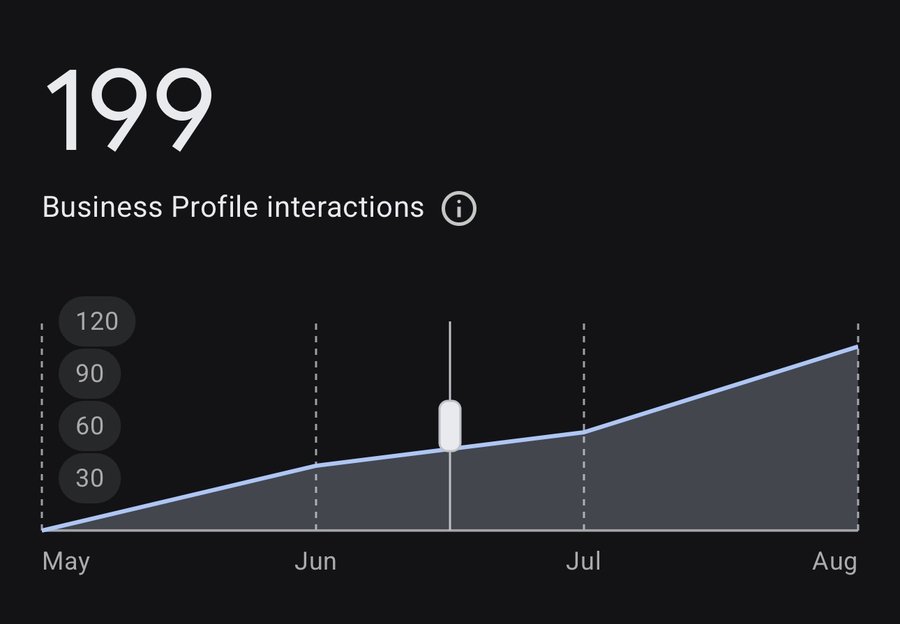
Real Google Business Profile data
199 Business Profile interactions in four months
Straight out of the Google Business Profile dashboard: calls, direction requests, and website clicks from people searching on Google and Google Maps, May through August 2026. Climbing every single month. That is what happens when the Business Profile, the map pack, and the website are all pulling in the same direction.